
The design and layout of complex documents has long been considered an exclusively human craft. Graphic designers spend hours adjusting margins, tweaking typography, aligning tables, and manually nudging images to achieve perfect visual balance.
However, in industries that handle massive, data-driven publications—such as financial institutions generating prospectuses, aerospace manufacturers producing repair manuals, and retailers compiling regional catalogs—manual layout is a critical bottleneck. It is slow, highly expensive, and prone to human error.
To solve this scaling problem, organizations are leveraging Specialized Layout and Design Automation. This discipline focuses on building algorithmic layout engines that take highly dynamic, structured data (such as XML, JSON, or database feeds) and programmatically assemble it into highly complex, brand-compliant publications.
This article explores the algorithmic logic, layout paradigms, and system architectures required to build automated design systems that operate at enterprise scale.
The dynamic layout dilemma: why static rules fail
Traditional design templates rely on fixed page layouts. A designer sets up a text box here, an image frame there, and hopes the incoming content fits.
In automated document production, however, the content is highly variable. A financial prospectus might have a table with 3 rows in one report, and a table with 150 rows in another. A technical manual might have a troubleshooting step with a single warning image, or a sequence of 10 consecutive diagrams.
If you attempt to apply a static, rigid template to this variable data, the layout immediately breaks:
- Tables will overflow and collide with text frames.
- Images will be separated from their corresponding captions.
- Inappropriate page breaks will occur, leaving headers isolated at the bottom of pages (orphans) or single lines of text stranded at the top (widows).
To prevent these formatting disasters, automated design systems must utilize Algorithmic Layout Engines. These engines don’t use static templates; they use programmatic design systems built on flexible constraint-based algorithms.
Core technologies and layout paradigms
Building an automated layout engine requires selecting the right software stack and layout methodology. There are two primary paradigms in modern layout engineering:
A. CSS Paged Media and HTML-to-PDF Engines
For many web-centric organizations, using web technologies to design physical print pages is highly efficient. The World Wide Web Consortium (W3C) has established the CSS Paged Media Module, which extends traditional CSS with print-specific properties (such as @page rules, page breaks, running headers/footers, and page-number counters).
/* Conceptual example of CSS Paged Media rules */
@page {
size: A4 portrait;
margin: 20mm 15mm 20mm 15mm;
@top-center {
content: “Enterprise Quarterly Report”;
font-family: “Noto Sans”, sans-serif;
font-size: 9pt;
}
@bottom-right {
content: counter(page);
}
}
.section-title {
break-before: page; /* Ensures sections always start on a fresh page */
}
Engines like DocRaptor, PrinceXML, or Weasyprint ingest highly semantic HTML5 and validate it against CSS Paged Media rules to generate incredibly precise, pixel-perfect PDFs at scale.
B. Adobe InDesign Server and XSL-FO
For highly complex, high-end publications that require traditional desktop-publishing quality, developers leverage enterprise layout engines like Adobe InDesign Server or XSL-FO (Extensible Stylesheet Language Formatting Objects) processors (like Antenna House or Saxon).
In this paradigm, the layout engine programmatically builds documents using a coordinate-based grid. Designers write custom JS scripts or XSLT stylesheets that programmatically create frames, apply master page spreads, link text threads, import vector graphics, and adjust text styling dynamically.
Algorithmic challenges in automated page assembly
Developing a layout engine involves solving classical computer science optimization problems, specifically spatial packing and line-breaking algorithms.
A. The Knuth-Plass Line-Breaking Algorithm
At the heart of professional typography is the Knuth-Plass algorithm, which determines how words are distributed across lines in a paragraph.
Input: [A] [large] [unstructured] [technical] [document]
Goal: Distribute words to minimize “badness” (excessive spacing or hyphenation)
Line 1: A large unstructured [Badness score: 12]
Line 2: technical document. [Badness score: 2]
Optimized Layout:
Line 1: A large unstructured technical
Line 2: document. [Global Badness score: 4]
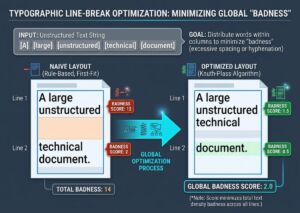
Traditional web browsers use a simple “first-fit” approach, wrapping text as soon as it hits the margin. A professional layout engine looks at the entire paragraph as a unified system, mathematically calculating a “badness score” for every possible line-break permutation to achieve a visually balanced block of text.
B. Collision Avoidance and Float Orchestration
When generating technical manuals or catalog pages, images and tables must stay close to the text that references them. If the layout engine simply places an image directly where it is defined, it might end up split in half across a page boundary.
To solve this, layout engines implement float orchestration algorithms:
- Look-Ahead Analysis: The engine reads the upcoming content block (paragraphs, tables, images) and calculates their combined spatial height.
- Constraint Checking: It checks if the remaining space on the current page can accommodate the content.
- Dynamic Shifting: If the space is insufficient, it programmatically shifts the image to the top of the next page, dynamically pulls the following paragraph forward to fill the gap on the current page, and inserts a visual anchor link or “See Figure 2” reference.
The architecture of an automated layout pipeline
An enterprise automated layout pipeline is designed to be completely headless, event-driven, and highly scalable.
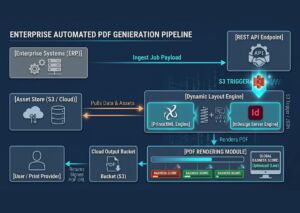
This headless architecture allows organizations to generate thousands of complex, highly customized documents concurrently. For instance, a global bank can automatically generate and email personalized investment portfolios to 50,000 clients in a matter of minutes, ensuring that each PDF is perfectly formatted, visually balanced, and completely compliant with corporate branding guidelines.
Merging Data and Design
Manually laying out content is a bottleneck that modern, fast-moving enterprises can no longer afford. Transitioning to Specialized Layout & Design Automation is not about removing the designer’s touch; it’s about translating their design rules into clean, resilient algorithms. By building modular design systems, utilizing advanced constraint-based layout engines, and deploying event-driven processing pipelines, organizations can turn static templates into dynamic, beautiful canvases that scale effortlessly to handle any amount of data.
Enterprise Compliance, Accessibility, and Internationalization
For global organizations, automated design engines must look past pure aesthetics and resolve rigid regulatory and linguistic constraints. Operating at an enterprise scale requires algorithms to handle localized multi-language rendering and universal digital accessibility automatically.
A. Tagged PDFs and Accessibility (Section 508 / PDF/UA)
Many automated documents—such as government compliance sheets, utility invoices, and educational directories—must comply with strict digital accessibility mandates like Section 508. While a human designer manually assigns semantic tags inside desktop publishing software, automated layout engines must programmatically compile Tagged PDFs (PDF/UA standard) directly from raw data streams.
- Logical Reading Orders: The engine automatically maps data properties (like <H1>, <p>, or <aside>) to internal PDF structure trees. This guarantees screen readers navigate the final document linearly, even if elements are visually rearranged by the engine’s float optimization.
- Table Scoping: Data tables with nested dimensions are dynamically injected with cell structures and explicit scope properties (rowgroup, colgroup), allowing text-to-speech software to logically articulate complex data points.
- Alt-Text Propagation: Image assets fetched from remote repositories are cross-referenced with database string parameters, binding alternative descriptions natively to graphic container structures.
B. Font Fallbacks and Unicode Glyph Coverage
Automating publications for a global market means your content streams will frequently feature diverse character sets, including localized Cyrillic, Greek, Arabic, or Hanji scripts. If an incoming text block contains a symbol missing from the primary corporate font, traditional layout software fails, throwing a layout error or printing unreadable empty blocks (known as “tofu”).
Advanced programmatic design systems prevent this through automated Font-Fallback Trees. When a rendering instance flags an unrecognized Unicode character, the layout engine queries a centralized typography asset vault. It dynamically substitutes the character with a structurally matching fallback font (such as the Google Noto family) to seamlessly print the script while maintaining text wraps, column rules, and baseline grid alignment.
Real-world implementations: automation in action
When layout rules are successfully translated into resilient code, organizations unlock massive operational efficiencies. Here is how dynamic page assembly scales across diverse sectors:
| Industry Sector | Data Input Type | Core Layout Challenge | Automated Business Outcome |
| Global Investment Banking | High-velocity JSON portfolios & financial database streams | Severe tabular overflow; rapid structural changes week-over-week | 50,000 personalized, brand-compliant client prospectuses rendered in minutes |
| Aerospace Manufacturing | XML strings and complex DITA engineering repositories | Managing hundreds of diagnostic diagrams near anchoring text references | On-demand generation of up-to-date, multi-page component maintenance manuals |
| Enterprise E-Commerce | Cloud PIM databases and dynamic regional pricing feeds | High-density grid packaging and automated multi-lingual translation | Thousands of localized seasonal product catalogs produced with zero manual desktop publishing |
The paradigm shift to coded design systems
The traditional separation between data management and graphic design is vanishing. Manually tweaking pages element-by-element remains a costly operational bottleneck that fast-moving enterprises can no longer afford to sustain.
Transitioning your workflow to Specialized Layout & Design Automation is not an erasure of the graphic designer’s value. Instead, it elevates the craft. It shifts designers away from the tedious work of manually nudging elements, adjusting text margins, and rebuilding broken frames. It empowers them to become architects of programmatic design systems, translating their creative intuition, visual expertise, and brand guidelines into clean, resilient layout code.
By combining structured data models with advanced layout frameworks—whether you choose the web-friendly agility of CSS Paged Media or the pixel-perfect control of Adobe InDesign Server and XSL-FO—your organization can transform static, fragile templates into dynamic, beautiful canvases. Implementing an event-driven, headless document production pipeline ensures that your enterprise publications scale effortlessly alongside your data, generating perfectly balanced, compliant, and striking content at any volume.