


Modern enterprise software runs at incredible speeds. Core enterprise platforms, ERPs, and cloud CRMs process millions of transactions per second with mathematical precision. Yet, inside most operational workflows, high-velocity digital infrastructure comes to a screeching halt the moment a customer, vendor, or internal team sends a PDF, scanned form, or email attachment.
This operational friction is known as the PDF-to-system gap: the missing connective tissue between unstructured business inputs and structured enterprise databases.
While digital transformation roadmaps focus on AI agents and predictive analytics, daily operations are still bogged down by teams manually copying invoice totals, verifying onboarding IDs line by line, and chasing stuck approvals across cluttered inboxes. Closing this gap is not just an IT cleanup project—it is a mandatory shift toward Document Intelligence or Intelligent Document Processing.
The manual translation tax: the hidden drag on operational velocity
Every organization pays a silent, recurring penalty for unstructured document inputs: the manual translation tax.
Instead of data flowing seamlessly into enterprise systems, teams end up building an entire workaround process—using extra time, labor, and manual steps—just to copy information out of incoming PDFs and re-key it into core database fields.
When a $50,000 vendor invoice or a complex employee onboarding packet arrives as a PDF, it triggers an expensive, multi-step manual process:
Document intake: The document arrives via email, portal upload, or scan queue.
Manual interpretation: A human operator opens the attachment, identifies the context, and scans the document visually.
Data keying: The operator types key values into a core enterprise platform.
Discrepancy checking: If a purchase order number is missing or a line item does not match, the workflow pauses, starting an email chase for clarification.
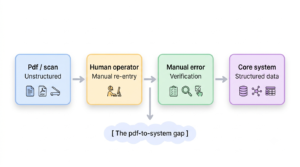
This manual relay race creates four major operational roadblocks:
Inflated operating costs: Paying skilled operational talent to act as human data-copying tools.
Severe processing latency: Turnaround times stretch from minutes into days or weeks.
Upstream data corruption: Keying errors introduce downstream reporting and financial reconciliation risks.
Zero operational visibility: Process bottlenecks stay hidden inside personal email inboxes.
Anatomy of the gap: why modern ERPs suffer from PDF blindness
Core business engines run on strict relational database rules. They demand clean strings, precise floats, and verified unique identifiers. Documents, on the other hand, are designed for human eyes. PDFs contain unstructured visual layouts, varying line-item tables, dynamic key-value pairs, and ambiguous terminology.
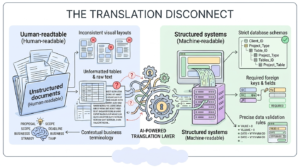
This gap persists even in digitally mature enterprises for three root causes:
Process design built around shared drives and email: Workflows were built around human handoffs rather than machine-to-machine integrations.
Departmental silos: Finance, legal, logistics, and HR each handle incoming documents using custom, unstandardized habits.
Fragmented system integrations: Companies automate structured API connections between systems, but leave messy document-based inputs to human workarounds.
The OCR trap: why reading is not understanding
Many companies attempt to solve this challenge using traditional Optical Character Recognition (OCR) tools. They quickly discover that basic text extraction fails to deliver true operational automation.
Traditional OCR extracts raw characters, but it cannot understand operational context.
An OCR engine may scan a string of numbers like “1000459” with high accuracy. However, it cannot determine whether that string represents an invoice number, a purchase order ID, a vendor identification code, or a zip code.
Without intelligent context and automated validation, high extraction accuracy still leads to 0% straight-through processing because a human must verify every field before committing it to a database.
| Technology stack | Functionality | Business outcome |
| Traditional OCR | Converts image pixels to raw text | Raw text strings (requires manual work) |
| Intelligent document processing (IDP) | Extracts entities and key-value pairs | Contextual fields (needs validation) |
| Document process intelligence (DPI) | Extracts, validates data, and triggers workflows | Straight-through processing (STP) |
Moving from simple text reading to full process intelligence requires connecting document content directly to automated business validation logic.
Cross-functional impact and industry spotlights
The PDF-to-system gap creates costly operational friction across every key business unit:
| Department / industry | Unstructured input | Operational bottleneck |
| Accounts payable | Invoices, receipts, tax forms | Duplicate payments, lost early payment discounts |
| Supply chain & logistics | Bills of lading, custom declarations | Shipment holds, costly port demurrage fees |
| HR operations | ID proofs, tax documents, certifications | Delayed onboarding, compliance exposure |
| Banking & insurance | Claims forms, KYC packs, loan statements | Slow turnaround times, customer churn |
Real-world business cases
Zoom Insurance Brokers
An AI-powered Intelligent Document Processing platform automated unstructured claim forms and policy intake for Zoom Insurance Brokers, accelerating total claims processing speed by 70%.
Global enterprise HR department
An AI-driven OCR and IDP solution replaced manual document entry for global HR operations with intelligent extraction, delivering an 85% reduction in processing time and 97%+ accuracy.
Grays Inc. supply chain operations
Custom IDP models automated high-volume vendor invoices and logistics paperwork for Grays Inc., eliminating manual entry bottlenecks and accelerating total supply chain processing velocity.
The 6-layer architecture of document intelligence
To successfully transform document inputs into structured, system-ready data, organizations need an end-to-end operational framework built on six modular layers:
| Pipeline stage | Functionality | Description |
| 1. Ingestion | Multi-channel capture | Ingests document inputs across email, API, cloud storage, portals, and scans |
| 2. Classification | Intent parsing | Recognizes document types and determines intent via language models |
| 3. Extraction | Contextual data capture | Performs high-fidelity extraction of key fields, tables, and line items |
| 4. Validation | Automated cross-checking | Validates extracted data against master core enterprise system records |
| 5. HITL review | Exception management | Routes low-confidence fields for human review based on scoring models |
| 6. Integration | Core system posting | Enables direct database posting to SAP, Salesforce, Workday, and APIs |
The 6 architectural layers
- Multi-channel ingestion layer: Ingests document inputs across all sources, including email inboxes, S3 buckets, REST APIs, web portals, and mobile scans.
- Semantic classification layer: Uses machine learning models to identify document types and determine their intent.
- Contextual extraction layer: Pulls key-value pairs, nested tables, and line items without relying on rigid, pre-built templates.
- Automated business validation layer: Runs extracted values against master enterprise data by performing 3-way matching, tax logic checks, and vendor validations in real time.
- Governed human-in-the-loop layer: Calculates confidence scores for every field, automatically passing high-confidence items while routing low-confidence fields for review.
- Enterprise integration layer: Pushes validated, structured data directly into core databases using production-grade APIs via Intelligent Workflow Orchestration Services.
Governed human-in-the-loop operations
A common automation mistake is trying to eliminate human review entirely from day one. High-performing operational systems use human expertise strategically through human-in-the-loop exception routing.
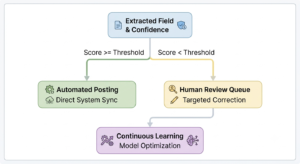
Instead of requiring staff to type out full documents manually, an intelligent exception engine presents operators with a pre-highlighted visual review interface:
Targeted validation: Operators review only flagged, low-confidence fields, reducing review time from minutes to seconds.
Continuous learning: Operator corrections automatically train and refine extraction models over time.
Audit logging: Every manual approval, modification, and timestamp is tracked for security, risk control, and governance compliance.
The implementation roadmap: From isolated pilot to scale
Enterprise automation fails when organizations attempt a risky, all-at-once transformation. The most successful teams follow a manageable, phased implementation path:
Phase 1: Discovery
Map document flows, volume spikes, and cost per document.
Phase 2: Targeted Pilot
Deploy Document Intelligence on one high-volume, high-friction workflow.
Phase 3: Governance
Define validation thresholds and Human-in-the-Loop (HITL) escalation paths.
Phase 4: Expansion
Scale intelligent automation to adjacent business units.
Avoiding common implementation pitfalls
To keep your document intelligence deployment on track, avoid these three common mistakes:
Over-automating exceptions too early: Focus first on getting standard, high-volume documents to straight-through processing before spending time on rare edge cases.
Ignoring input quality control: Build clear validation checks at the ingestion layer to flag corrupted scans or incomplete attachments immediately.
Failing to define process ownership: Assign clear accountability between IT engineering teams and business unit leaders for ongoing workflow governance.
Measuring strategic business ROI
Evaluating an enterprise Document Intelligence initiative requires looking beyond simple time-saved estimates. Measure its strategic impact using hard business metrics:
- Straight-through rate (STP): Tracks the percentage of documents processed end-to-end without any human touch points or manual interventions.
- Operational cycle time: Measures total elapsed time from initial document receipt to final core system database posting.
- Cost-per-document: Quantifies the direct operational expense allocated to intake, manual review, keying, and exception handling.
- First-pass accuracy: Verifies the precision rate of extracted data against master enterprise database validation checks.
Unlocking enterprise value through intelligent document workflows
By engineering custom document workflows tailored to your underlying data architecture, organizations can turn unstructured document backlogs into clean, actionable data streams.
To explore how your business can eliminate document handling friction and automate complex data workflows, visit our Document & data intelligence services.
